
Download MX_FFmpeg (Codecs for MX Player) – video player, audio player, codecs, MX Player, Android, media player, multimedia, playback, format support, hardware acceleration, subtitle support, multi-core decoding, Android app, mobile app, utility, tool
Overview
MX_FFmpeg (Codecs for MX Player) is a specialized utility designed to enhance multimedia playback on Android devices by providing robust codec support for the MX Player ecosystem. Developed by MX Tech, the app functions as a supplementary component that enables advanced playback capabilities for video and audio files across a vast array of formats. Its primary purpose is to ensure seamless compatibility with diverse media files, eliminating common playback issues such as unsupported formats or poor performance. The app is particularly beneficial for users who frequently access media files in non-standard or rare formats, including MKV, AVI, FLAC, and others.
Target users include Android enthusiasts, multimedia collectors, and individuals who rely on high-quality playback for movies, TV shows, and music. The app addresses the persistent challenge of format incompatibility on Android, where native media players often fail to decode certain files. By extending MX Player’s capabilities, MX_FFmpeg fills a critical gap in the mobile media landscape, offering a reliable solution for users seeking a universal playback experience. While the developer did not provide additional technical details about the app’s architecture or licensing, its role as a codec pack underscores its importance in enabling full functionality for the parent application.
Real-world use cases include streaming high-resolution videos from local storage, playing region-locked content, or enjoying lossless audio tracks without requiring external tools. The app’s lightweight design and free availability further enhance its accessibility. Although compatibility information was not fully disclosed, its integration with MX Player suggests it is optimized for modern Android devices with hardware decoding support.
Key Features & Functionality
- Comprehensive Format Support – MX_FFmpeg ensures playback of virtually all audio and video formats, including MKV, AVI, MOV, FLV, OGG, FLAC, and more. This eliminates the need for file conversion and allows users to play media directly from storage or cloud sources.
- Advanced Hardware Acceleration (HW+ Decoder) – The app leverages hardware acceleration to offload decoding tasks from the CPU, reducing battery consumption and improving playback smoothness, especially for high-bitrate and 4K content.
- Multi-Core Decoding – As the first Android video player to implement multi-core decoding, MX_FFmpeg distributes decoding workloads across available CPU cores, significantly improving performance on multi-core devices.
- Extensive Subtitle Support – Users can load and synchronize external subtitle files (SRT, SUB, ASS, etc.) with precise timing, enhancing accessibility and language comprehension for international content.
- Optimized for MX Player Integration – The app is designed to work exclusively with MX Player, enhancing its playback engine with additional decoding capabilities without requiring standalone functionality.
For example, a user watching a 1080p MKV file with a FLAC soundtrack on a mid-tier Android device would experience smooth playback due to hardware acceleration and multi-core decoding. Similarly, a language learner using SRT subtitles for a foreign film can rely on accurate synchronization and clear rendering.
Interface, UX & Performance
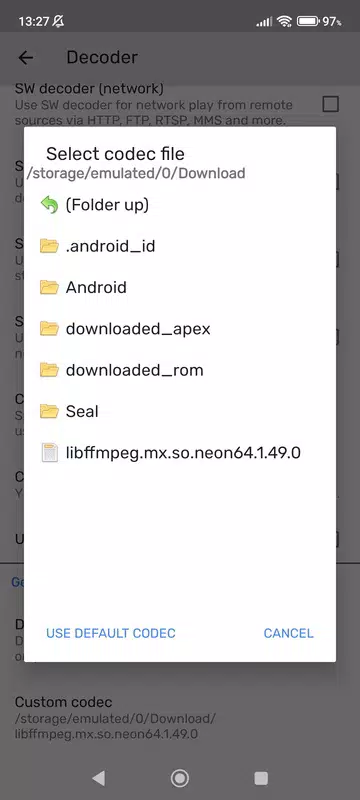
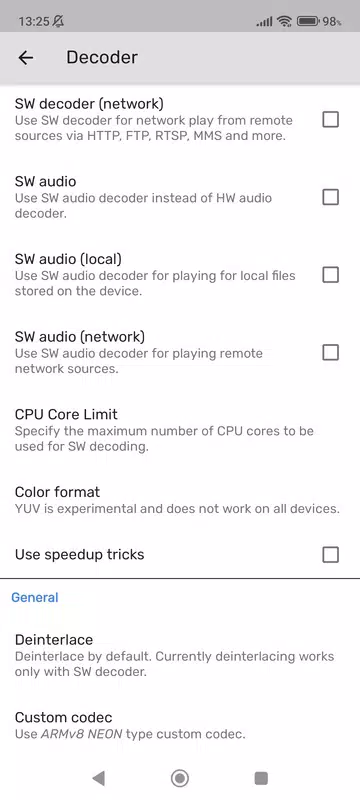
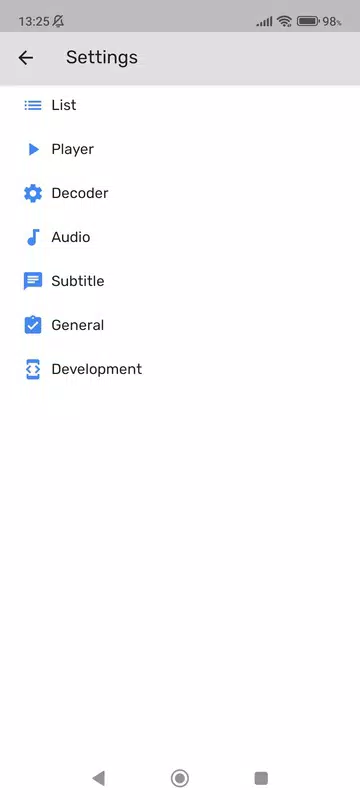
The user interface of MX_FFmpeg is minimal and focused, reflecting its role as a background codec pack rather than a standalone media player. It does not feature a graphical interface for media playback, as it operates in conjunction with MX Player. Instead, users interact with the app through the parent application’s settings, where codec selection and playback preferences are managed.
Navigational flow is indirect, relying entirely on MX Player’s interface. This design choice ensures a streamlined experience but may confuse users unfamiliar with the app’s dependency structure. The lack of a dedicated UI means there are no on-screen controls, menus, or playback options within MX_FFmpeg itself.
Performance is optimized for efficiency, with a file size of just 12.8 MB. Although the developer did not list formal performance metrics, the app’s integration with hardware acceleration and multi-core decoding suggests strong responsiveness on devices with capable processors. Stability is expected to be high, given its focused purpose and minimal resource usage. However, compatibility with older Android versions was not specified.
Platform Compatibility & Technical Requirements
MX_FFmpeg (Codecs for MX Player) is available exclusively on the Android platform. The app is designed to run on devices using Android OS, though specific minimum OS requirements were not listed. The current software version is 1.2.4, and the file size is 12.8 MB, indicating a lightweight footprint suitable for most Android devices.
Given its role as a codec pack, the app likely requires a compatible version of MX Player to function. However, the developer did not disclose detailed compatibility information, including supported Android versions or device architectures. Users should ensure their device meets the requirements of the parent application to benefit from MX_FFmpeg’s capabilities.
Pros and Cons
Pros
- Supports a wide range of audio and video formats without conversion
- Enables hardware acceleration for smoother playback and lower battery drain
- Offers multi-core decoding for enhanced performance on modern devices
- Provides robust subtitle compatibility with accurate synchronization
- Free to download and install, with a minimal file size of 12.8 MB
Cons
- Not a standalone player; requires MX Player to function
- No user interface for direct interaction or settings
- Compatibility with older Android versions was not specified
- Limited to Android platform; no iOS or other OS support
- Dependent on the parent app’s development and updates
FAQ
Is MX_FFmpeg (Codecs for MX Player) free to use?
Yes, the app is available at no cost. It does not require in-app purchases or subscriptions.
Do I need to install MX Player to use MX_FFmpeg?
Yes, MX_FFmpeg is designed to work exclusively with MX Player. It enhances the playback capabilities of the parent application but cannot function independently.
Can I use MX_FFmpeg on iOS devices?
No, the app is currently only available for Android. There is no official iOS version or support.
What types of media files does MX_FFmpeg support?
It supports a broad range of formats, including video (MKV, AVI, MOV, FLV, MP4) and audio (FLAC, OGG, AAC, WAV), as well as external subtitle files (SRT, SUB, ASS).
How do I update MX_FFmpeg?
Updates are typically delivered through the Google Play Store or official distribution channels. Users should ensure both MX Player and MX_FFmpeg are updated to the latest versions for optimal compatibility.
Final Thoughts
MX_FFmpeg (Codecs for MX Player) is a powerful, lightweight utility that significantly enhances the multimedia experience on Android devices. While not a standalone player, its role as a codec extension makes it indispensable for users who demand universal format support, high performance, and accurate subtitle playback. The integration of hardware acceleration and multi-core decoding ensures smooth playback even on demanding content, while the free model and small size make it accessible to a broad audience.
It is particularly valuable for media enthusiasts, travelers, and language learners who rely on diverse content sources. Its seamless integration with MX Player and focus on technical efficiency reflect a well-architected solution to a common mobile playback challenge. For anyone seeking a reliable, high-performance media experience on Android, MX_FFmpeg delivers unmatched value.
Download MX_FFmpeg (Codecs for MX Player) now


